Overview
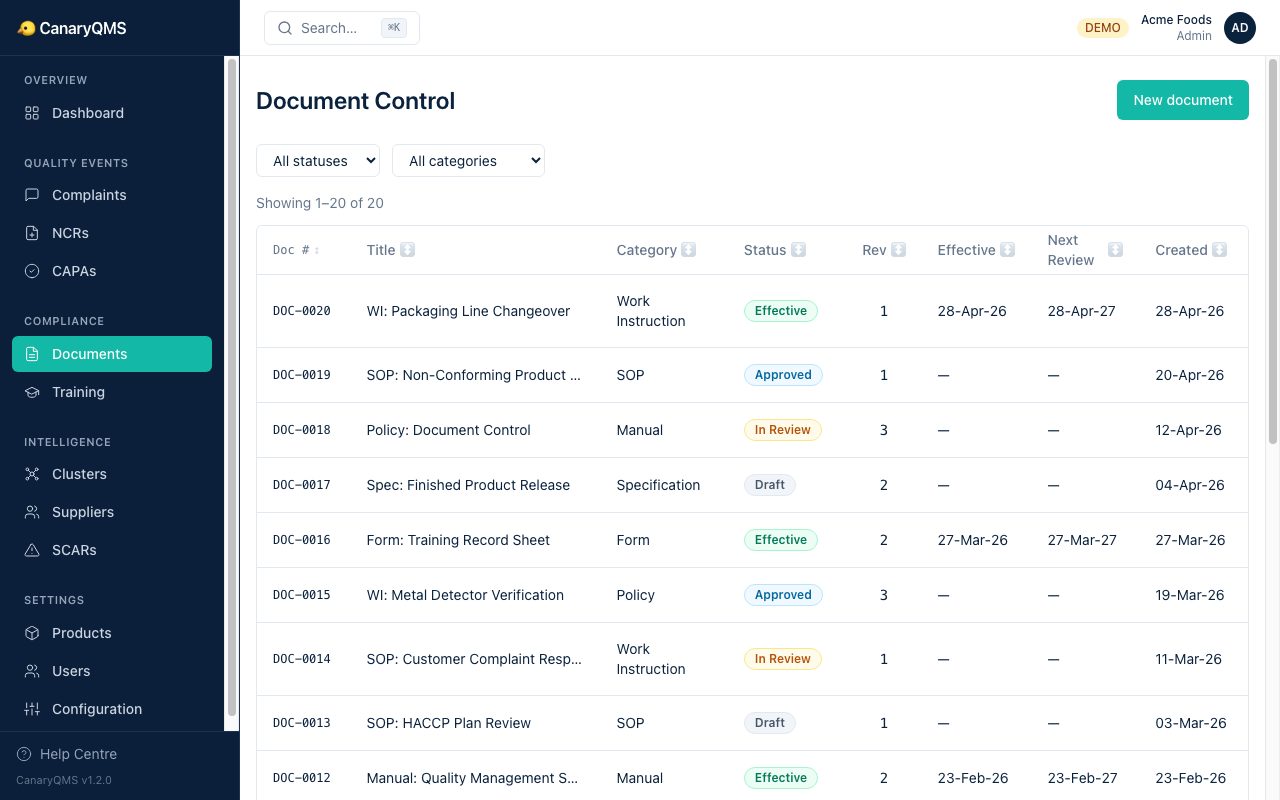
Document Control manages your organisation's SOPs, work instructions, policies, forms, specifications, and manuals. Every document has a unique reference (e.g. DOC-0001), version history, and approval workflow.
Document Categories
- SOP — Standard Operating Procedures
- Work Instruction — step-by-step task guides
- Policy — organisational policy statements
- Form — blank templates and checklists
- Specification — product or material specifications
- Manual — quality management system manuals
Revision Management
When you update a document, upload a new revision. Each revision records the revision number, change description, who uploaded it, and when. Previous revisions are retained.
Review & Approval Lifecycle
- Draft — being written or revised
- In Review — submitted for approval
- Approved — reviewed and signed off
- Effective — active and in use
- Superseded — replaced by a newer version
- Obsolete — withdrawn from use
The creator cannot approve their own document (separation of duties).
Linking to CAPAs and Training
Documents can be linked to CAPAs and to training requirements (e.g. "all Quality Engineers must review DOC-0002 annually").