Overview
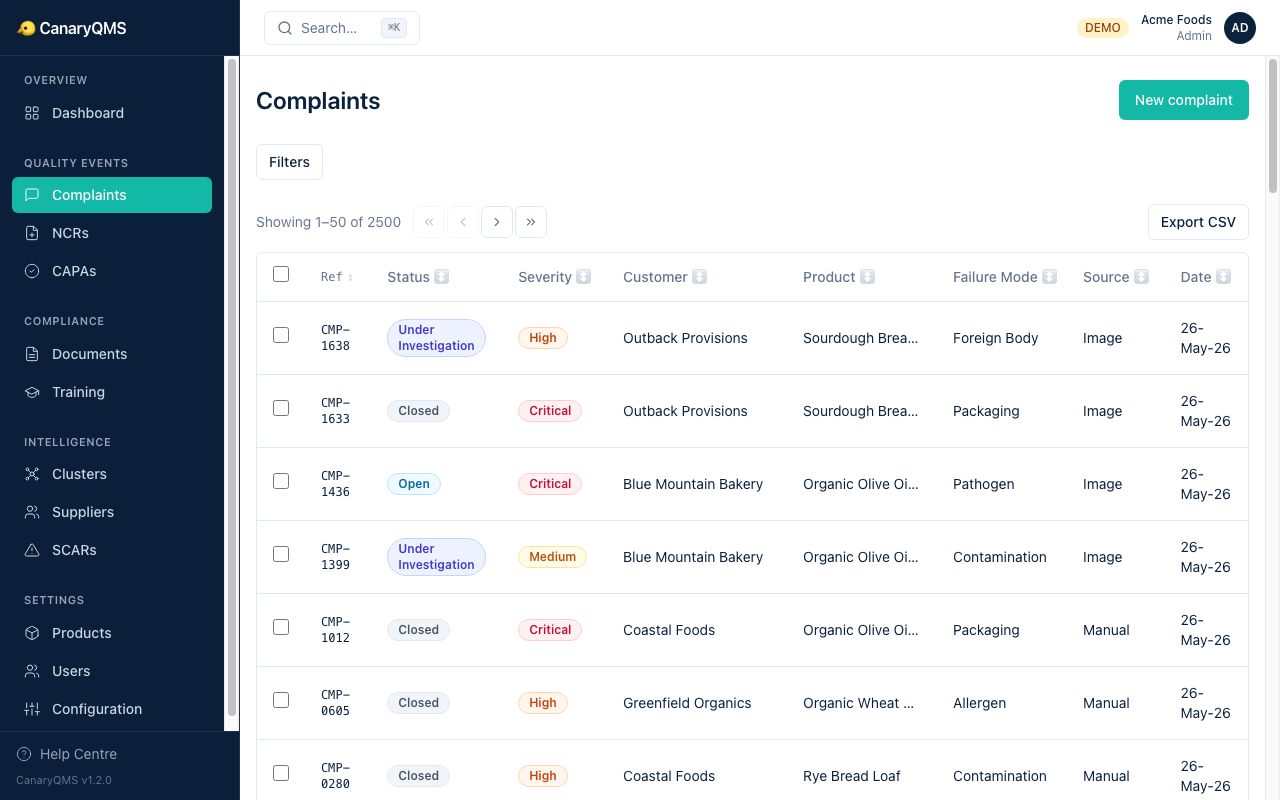
Complaints are the entry point for most quality events. A customer reports an issue, you log it, the AI triages severity, and you decide whether it needs a formal investigation (NCR).
Intake Methods
Manual Entry
Click New complaint and fill in the form: customer name, product, lot number, failure mode, and description. Select a severity and confirm.
Email Extraction
Paste the raw email text into the extraction field. The AI reads the email and extracts structured fields: product, lot number, customer, failure description, and suggested severity with reasoning.
Image/PDF Upload
Upload a photo of a complaint letter, delivery note, or inspection report. OCR extracts the text, then AI structures it the same way as email extraction.
Severity Triage
The AI suggests a severity level based on your organisation's configured severity matrix:
- Critical — immediate consumer safety risk, potential recall, regulatory notification required
- High — significant quality failure, batch-level impact, customer relationship at risk
- Medium — quality deviation, limited impact, no immediate safety concern
- Low — minor issue, cosmetic, no product integrity impact
You can override the AI suggestion — if you do, you must provide a reason (captured in the audit trail).
Similar Complaints
When you view a complaint, the system shows the top 3–5 similar past complaints using semantic search. This helps identify patterns early.
Status Lifecycle
- Open — newly logged, awaiting investigation decision
- Under Investigation — an NCR has been created or investigation is in progress
- Closed — resolved, no further action required
Reference Numbers
Each complaint gets a unique reference (e.g. CMP-0001). This reference is permanent, never changes, and can be used in URLs: /ref/CMP-0001.